Online shopping from Japan made easy with ZenMarket
ZenMarket is a proxy service that helps you buy from Japanese stores that do not ship overseas on their own — quick and easy! Sign up for free to receive a 500 ZenPoints as a welcome bonus.
ZenMarket is a proxy service that helps you buy from Japanese stores that do not ship overseas on their own — quick and easy! Sign up for free to receive a 500 ZenPoints as a welcome bonus.
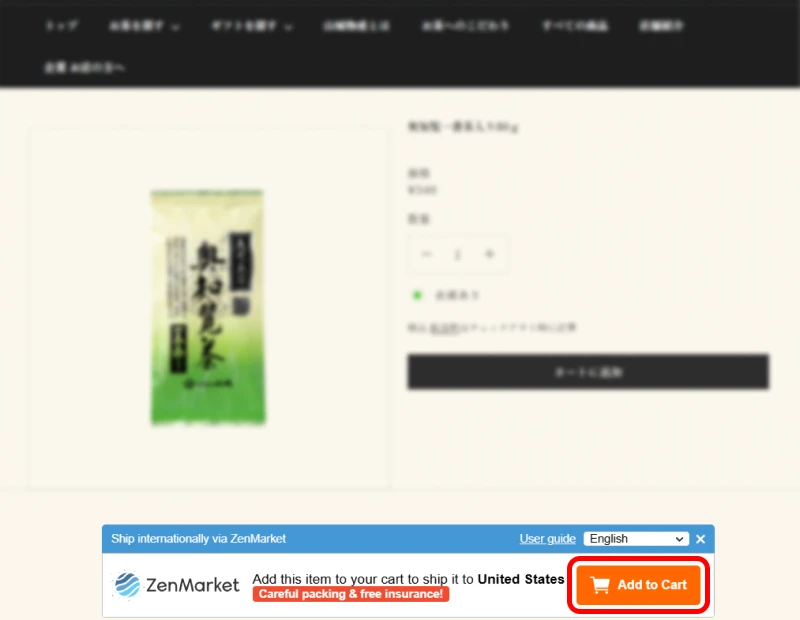
When checking out a product on a Japanese site, look for the ZenMarket banner, usually near the bottom of the page, and simply click or tap the Add to Cart button.
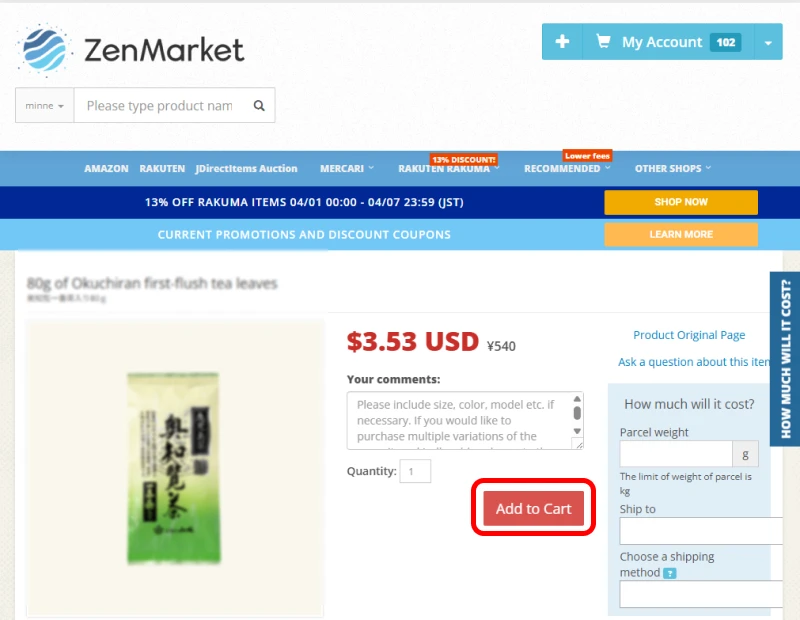
You’ll be redirected to the product page on ZenMarket—select any options (size, color, etc.) and click “Add to Cart” again. If you’re logged in, you can go to My Account to review your quote when it’s ready. If not, you’ll be prompted to log in or create an account first.
In order to proceed from there, you will need a free ZenMarket account.
For a more seamless experience, sign up now.
Have further questions regarding the buying process? Dive into our guide blog for more details, or contact our customer support.
Go to any Japanese online store, copy the product link and paste it into our search bar to order!
Read our simple tutorial to learn more about the process.
Don't know where to begin? Check out ZenMarket recommended stores!
They have lower service fees and many coupons for you to save even more.
Visit our COUPON PAGE to get special deals!
Watch our full tutorial and find out how to buy items from Japan and have them delivered straight to your door.
Register now and get 500 ZenPoints so you can save on international shipping costs!
Sign up now!
Are you looking for a particular product? Would you like advice on buying from a particular site? Need to speak to someone but don't speak Japanese? Our customer service team is on hand to help and answer all your questions in 19 languages, during and after purchase.

We are proud to offer many different shipping methods to suit your needs. Whether you need a cheaper option or want your package as soon as possible, we have you covered. We partner with many companies to offer you the best rates. You can read more about our shipping methods, packing strategies and more here.



 and more..






Our Trustpilot reviews provide valuable insights into the experiences of our customers, showcasing their trust and satisfaction with ZenMarket. Explore what our clients have to say and discover why ZenMarket is the preferred choice for hassle-free Japanese shopping.
ZenMarket is a purchasing intermediary for Japan, also known as a purchasing proxy, or proxy buying service, i.e. a service that allows you to buy products from Japanese sites from home, even if you aren't in Japan.
It's worth noting that the vast majority of Japanese sites and stores do not deliver outside Japan. This is the case for Mercari, one of Japan's leading e-commerce platforms.
ZenMarket is your key to unlocking the door to all those exclusive Japanese products you can't buy any other way.
Shopping Japan with ZenMarket offers many advantages:
We ship to most countries/regions. Please check shipping options for your country in our shipping fees calculator.
If no shipping methods appear for your country/region, it is unlikely we will be able to ship to your desired destination, meaning you will be unable to make use of this campaign.
Destination availability is subject to change based on the routes we are given access to by our shipping providers.
ZenMarket do not ship to any of the following destinations: Afghanistan, Belarus, Central Africa, Cuba, DR Congo, Iran, Iraq, Libya, Russia, Somalia, South Sudan, Sudan, and Syria.
ZenMarket charges a flat 500 yen fee per item. Here are some examples:
Multiples of an identical item purchased in one transaction do not multiply the fee. Buy in bulk and save!
ZenMarket stores your items for free in the warehouse for 60 days, giving you plenty of time to consolidate multiple orders into one parcel for international shipping.
If you want to store your items in our warehouse for more than 60 days, it will cost you 50 yen per day per item.
Please note that after 90 days, you must have shipped your items or they will be disposed.
Yes, it is possible to pre-order items on Japanese sites. Please note that ZenMarket will receive the item only after the store has shipped it, which sometimes takes several weeks or even months. Therefore, we advise you to check the release and delivery dates carefully before pre-ordering items.
Yes, you can withdraw the funds you added to your ZenMarket account at any time. From "My Account," click on the "Payments" tab, where you'll find a "Withdraw" button. Click it and indicate the amount in yen you wish to withdraw.
Please note that there may be transfer fees when withdrawing funds depending on the chosen payment method.
You can track your orders from your ZenMarket account by going to the "My Account" section and selecting "My Orders" from the dropdown menu. There, you will find a list of all your orders with their current status and tracking information (if available).
If tracking information is available, you can click on the tracking number to view detailed tracking information from the shipping carrier's website.
Additionally, once your order is shipped, you will receive an email notification with the tracking information.
All ZenMarket parcels are insured for damage or loss at no additional cost.
As we must wait for the completion of an investigation by your chosen shipping carrier to receive the insurance payout, we ask for your patience in these matters.